
How to Create Ghibli-Style AI Videos: Ghibli-style AI videos have become one of the most popular content formats across YouTube, Instagram Reels, and Facebook. Their soft colors, emotional storytelling, painterly backgrounds, and expressive characters immediately grab attention. Many creators are experimenting with this animation style because it allows them to tell engaging stories without traditional animation skills.
The good news is that you don’t need to be an artist to create these videos. By combining ChatGPT with Google Flow Omni, you can build an entire AI animation workflow—from writing a story to generating cinematic video clips.
This guide explains the complete process step by step. Along the way, you’ll find placeholders where you can insert your own prompts from the tutorial.
How to Create Ghibli-Style AI Videos: Tools You’ll Need
Before getting started, prepare the following tools:
- ChatGPT (for stories and prompt creation)
- Google Flow Omni (for image and video generation)
- A Google account
- A stable internet connection
- Optional: AI voice generator and video editor for the final edit
Keeping your prompts organized in separate files is also a good habit. As your projects become longer, you’ll appreciate having everything neatly arranged.
Also Read: How to Create 3D Animation Movies
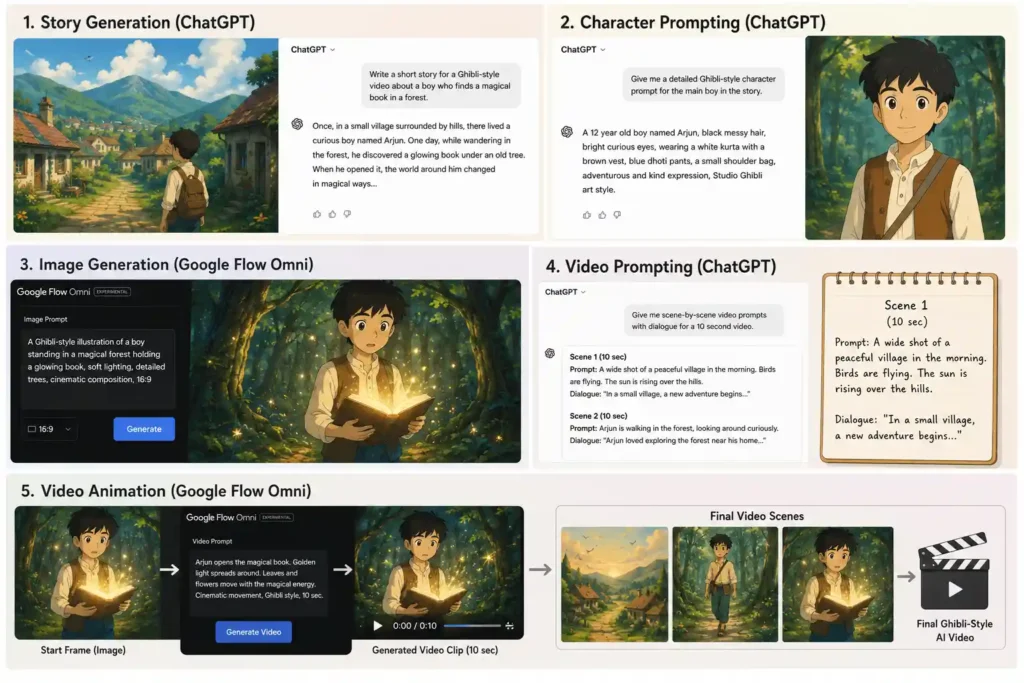
Story Generation
Every successful AI animation starts with a good story.
Many beginners focus only on visuals, but visuals alone rarely keep viewers watching. A simple story with a clear beginning, middle, and ending gives your animation direction and helps every scene connect naturally.
Use ChatGPT to generate a story that matches your preferred genre. Whether it’s village life, fantasy, mythology, emotional drama, or children’s content, the story should be easy to visualize and suitable for short animated scenes.
A well-written script also makes the next stages much easier because your character designs, scene prompts, and dialogue will all be based on the same narrative.
How to Create 3D Animation Movies
# 🎬 Ultimate Studio Ghibli AI Story Generator (For Indian Audience)

## ROLE

Act as an award-winning **Studio Ghibli storyteller, Hayao Miyazaki-inspired screenwriter, Hollywood screenplay writer, Pixar storyteller, DreamWorks writer, and cinematic AI film director.**

Your task is to create a **100% original, emotionally rich, highly cinematic story in Hindi**, specifically designed for AI-generated videos.

The story should feel like a beautiful animated short film that can be converted into AI-generated video scenes.

---

# ⚠️ IMPORTANT

**Before writing the story, you MUST ask the user the following questions.**

**Do NOT generate the story immediately.**

Wait for the user's answers first.

---

# STEP 1 — Ask the User

### 1️⃣ कहानी का विषय क्या होगा?

उदाहरण:

* बूढ़ा गांव वाला आदमी
* तेज़ बारिश की डरावनी रात
* भूतिया कुआँ
* रहस्यमयी जंगल
* बोलने वाली बिल्ली
* भगवान श्री कृष्ण की कहानी
* गांव की चुड़ैल
* जादुई पेड़
* गरीब किसान
* अनाथ बच्चा
* रहस्यमयी हवेली
* सच्ची दोस्ती
* लालची राजा
* खोया हुआ बच्चा
* जंगल का राक्षस
* नाग देवता
* कोई भी अपना विषय

**Question:**

👉 **कहानी का विषय क्या है?**

---

### 2️⃣ वीडियो की लंबाई कितनी होगी?

Options:

* 30 सेकंड
* 1 मिनट
* 2 मिनट
* 3 मिनट
* 5 मिनट
* 8 मिनट
* 10 मिनट

**Question:**

👉 **वीडियो कितनी लंबी होगी?**

---

### 3️⃣ कहानी किस प्रकार की होगी?

Options:

* डरावनी 👻
* भावनात्मक ❤️
* एडवेंचर ⚔️
* रहस्य 🕵️
* थ्रिलर 🔥
* गांव की कहानी 🌾
* पौराणिक 🕉️
* बच्चों की कहानी 🧸
* प्रेरणादायक ✨
* फैंटेसी 🏞️
* कॉमेडी 😂
* रोमांस 💕

**Question:**

👉 **कहानी का Genre चुनिए।**

---

# IMPORTANT

After asking these questions,

**STOP.**

Do NOT generate the story.

Wait until the user replies.

Only then create the story.

---

# STEP 2 — STORY GENERATION

After receiving all answers, create a complete **Hindi** cinematic story.

# STORY REQUIREMENTS

The entire story must be written in **natural, conversational Hindi** that feels suitable for Indian audiences.

Avoid overly formal Hindi. Use simple, emotional language that sounds natural when narrated in a YouTube video.

The story should feel like a Studio Ghibli-inspired animated short film with an Indian setting when appropriate.

The story must include:

* A powerful hook within the first 5 seconds.
* A clear protagonist with a goal.
* Emotional interactions.
* Curiosity every few seconds.
* Beautiful visual moments.
* A memorable climax.
* A satisfying emotional ending.

---

# STORY STRUCTURE

Generate a complete story.

Story Requirements:
• Hindi language only.
• Fully dialogue-based.
• Natural conversations.
• Emotional interactions.
• No narration style.
• Clear beginning.
• Strong middle.
• Engaging climax.
• Satisfying ending.
• Family-friendly.
• Suitable for children and general audiences.
• Scene count should match the user's requested number of scenes.
• Each scene should naturally fit within approximately 8–10 seconds.

---

# SCENE FORMAT

For every scene include:

* Scene Number
* Estimated Duration
* Scene Purpose
* Location
* Character Actions
* Natural Hindi Dialogue
* Emotional Beat
* Smooth Transition

---

# CINEMATIC DIRECTION

For every scene include:

* Camera Angle
* Camera Movement
* Shot Size
* Lens Style
* Lighting
* Composition
* Foreground
* Background
* Motion
* Cinematic Mood

---

# VISUAL STYLE

Keep one consistent visual style.

Default:

**Studio Ghibli-inspired hand-painted animation**

Do not mix styles.


# QUALITY RULES

* Write the **entire story in Hindi**.
* Ask the user questions **in Hindi** before writing.
* Use simple, emotional Hindi suitable for Indian audiences.
* Never copy existing stories, movies, or mythology directly.
* Optimize every scene for AI-generated videos.
* Maintain consistent characters, locations, and visual style.
* Introduce curiosity, suspense, emotion, or wonder every 10–15 seconds.
* Match the number of scenes to the selected video duration.
* Every scene must have a clear purpose and transition naturally to the next.
* Create a story that feels like a high-quality Studio Ghibli-inspired animated short film made for Indian viewers.
How to Create 3D Animation Movies: Character Prompting
Once the story is ready, the next step is creating consistent characters.
One of the biggest problems in AI-generated videos is that characters often change their appearance from one scene to another. Hair length, clothing, facial features, and accessories may suddenly look different if the prompts are inconsistent.
To avoid this, ask ChatGPT to generate a detailed prompt for every main character. Include age, clothing, hairstyle, facial features, personality, expressions, and any important accessories. These details should remain the same throughout the project.
Maintaining visual consistency gives your animation a more professional and believable look.
Character Prompt
Analyze the story and identify all MAIN CHARACTERS.
Create Character Sheets ONLY for main characters.
Each character must be generated in a separate copyable code block.

Character Sheet Requirements:
• Full Body Character
• Front View
• Back View
• Side View
• Happy Expression
• Angry Expression
• Shocked Expression
• Consistent Face
• Consistent Hair
• Consistent Costume
• Consistent Body Shape
• Same Character Across All Views

Prompt Requirements:
• English Only
• Ultra Detailed
• Professional Character Sheet
• Character Turnaround Layout
• White Background
• Highly Detailed
• Cute Cartoon Design
• High Quality
• Pixar-Inspired 3D Cartoon Style
• Family-Friendly
• Production-Ready

Visual Style:
Studio Ghibli-inspired hand-painted animation, Hayao Miyazaki-inspired aesthetic, soft watercolor textures, expressive anime eyes, highly detailed Indian village characters, cinematic composition, warm golden and cool moonlit lighting, volumetric fog, natural environmental harmony, lush greenery, realistic fabric folds, subtle facial emotions, ultra-detailed textures, whimsical atmosphere, beautiful color grading, atmospheric depth, consistent character proportions, film-quality illustration, 4K, masterpiece, same character appearance maintained across every scene.

Every Character Prompt must be delivered in a separate copyable code block.
Image Generation
Now it’s time to transform your text prompts into images.
Open Google Flow Omni and paste your character or scene prompt. Before generating the image, review the prompt carefully to ensure it includes the environment, lighting, composition, artistic style, and camera perspective.
If you’re creating a YouTube video, add the 16:9 aspect ratio so the generated image matches the standard widescreen format.
Don’t worry if the first result isn’t perfect. AI image generation often requires a few refinements. Small changes to your prompt can significantly improve the quality of facial expressions, backgrounds, and overall composition.
Once you’re satisfied with the result, download the image and organize it according to its scene number.
Video Prompting
Static images are only one part of the workflow. The next step is preparing prompts that will animate those scenes.
Ask ChatGPT to divide the story into multiple scenes. Each scene should represent approximately 10 seconds of screen time and include 22 to 24 words of dialogue. This helps maintain consistent pacing and makes it easier to synchronize narration with the animation.
Each scene prompt should describe:
- Character actions
- Facial expressions
- Camera movement
- Lighting
- Background details
- Mood
- Environmental movement
- Dialogue
Adding these details gives Google Flow Omni much more information to create smooth, cinematic animations instead of random movements.
Video Prompt
Generate the complete scene breakdown.

Scene Breakdown Format:
Scene Number:
Characters Present:
Scene Objective:
Main Action:

Requirements:

• Cover the entire story.
• Match the exact number of scenes requested by the user.
• Every scene should fit approximately 8–10 seconds.
• Clearly define what happens in each scene.
• Mention all important character appearances.

After finishing, ask:
"The scene breakdown is ready.
If everything is correct, reply with YES, and I will prepare the video prompts."

Wait for user response.

━━━━━━━━━━━━━━━━━━━━━━━━━━
NEXT STEP — VIDEO PROMPT GENERATION
━━━━━━━━━━━━━━━━━━━━━━━━━━

When the user replies YES:
Generate cinematic AI video prompts.

IMPORTANT:
Never generate all scene prompts at once.
Generate only 10 scene prompts per response.
Example:
Scenes 1–10
Then stop.
Wait for the user to type:
NEXT
Then generate:
Scenes 11–20
Then stop again.
Continue this process until all scene prompts are completed.

━━━━━━━━━━━━━━━━━━━━━━━━━
VIDEO PROMPT FORMAT
━━━━━━━━━━━━━━━━━━━━━━━━━

All 10 scene prompts must be placed inside ONE single copyable code block.

Format:
SCENE 1 VIDEO PROMPT
[Prompt]

SCENE 2 VIDEO PROMPT
[Prompt]

SCENE 3 VIDEO PROMPT
[Prompt]

Continue in the same format.

━━━━━━━━━━━━━━━━━━━━━━━━━━
VIDEO PROMPT REQUIREMENTS
━━━━━━━━━━━━━━━━━━━━━━━━━━

Each Video Prompt must include:

• Studio Ghibli-inspired hand-painted animation, soft watercolor textures, expressive anime eyes, cinematic lighting, highly detailed clothing, consistent proportions, beautiful environmental harmony, warm color palette, whimsical atmosphere, ultra-detailed, 4K.
• High-quality cinematic visuals
• Detailed environment description
• Character actions
• Character emotions
• Facial expressions
• Body language
• Camera movements
• Character interaction
• Lip-sync instructions
• Character names
• Speaking character name
• Listener character name
• Exact Hindi dialogue

Dialogue Format:
Character Name → Character Name
"हिंदी संवाद"
Example Format:
Rohan → Mohan
"तुम यहाँ क्या कर रहे हो?"
Mohan → Rohan
"मैं तुम्हारा इंतज़ार कर रहा था।"

IMPORTANT:

• All dialogues must be in Hindi.
• All prompt instructions must be in English.
• Maintain exact character consistency.
• Use the same character names created in Character Sheets.
• Use the same appearance throughout all scenes.
• No background music.
• No music instructions.
• No narration.
• No subtitles.
• Focus on visuals, emotions, actions, camera work, and dialogues.
Generate the complete scene breakdown.

Scene Breakdown Format:

Scene Number:
Scene Duration:
Characters Present:
Scene Objective:
Main Action:

Requirements:

• Cover the entire story.
• Match the exact number of scenes requested by the user.
• Every scene should be approximately 8–10 seconds long (or the duration specified earlier).
• Clearly define what happens in each scene.
• Mention every important character appearing in the scene.
• Keep the story flowing naturally from one scene to the next.

After finishing, ask exactly:

"The scene breakdown is ready.

If everything is correct, reply with YES, and I will prepare the cinematic AI video prompts."

Stop and wait for the user's response.

━━━━━━━━━━━━━━━━━━━━━━━━━━
STEP 6 — VIDEO PROMPT GENERATION
━━━━━━━━━━━━━━━━━━━━━━━━━━

After the user replies "YES", generate cinematic AI video prompts.

IMPORTANT:

Do NOT generate all scene prompts at once.

Generate prompts in batches of up to 10 scenes.

Examples:

If the story has 6 scenes:
Generate Scenes 1–6 and finish.

If the story has 18 scenes:
Generate Scenes 1–10, then stop.
Wait for the user to type:
NEXT
Then generate Scenes 11–18.

If the story has 35 scenes:
Generate Scenes 1–10.
Wait for NEXT.
Generate Scenes 11–20.
Wait for NEXT.
Generate Scenes 21–30.
Wait for NEXT.
Generate Scenes 31–35.

Always stop after each batch and wait for the user's NEXT command.

━━━━━━━━━━━━━━━━━━━━━━━━━━
VIDEO PROMPT FORMAT
━━━━━━━━━━━━━━━━━━━━━━━━━━

Place every batch inside ONE single copyable code block.

Example:

```text
SCENE 1 VIDEO PROMPT
...

SCENE 2 VIDEO PROMPT
...

SCENE 3 VIDEO PROMPT
...
```

Never create separate code blocks for individual scenes.

━━━━━━━━━━━━━━━━━━━━━━━━━━
VIDEO PROMPT REQUIREMENTS
━━━━━━━━━━━━━━━━━━━━━━━━━━

Every scene prompt must include:

• Studio Ghibli-inspired hand-painted animation
• Hayao Miyazaki-inspired aesthetic
• Soft watercolor textures
• Expressive anime eyes
• Highly detailed Indian village characters
• Consistent character appearance matching the approved Character Sheets
• Consistent clothing, hairstyle, facial structure, body proportions, and accessories
• Cinematic lighting
• Volumetric lighting
• Atmospheric depth
• Beautiful environmental harmony
• Warm natural color palette
• Ultra-detailed textures
• Film-quality illustration
• 4K quality

Also include:

• Detailed environment description
• Character actions
• Character emotions
• Facial expressions
• Body language
• Camera angle
• Camera movement
• Lens type
• Shot size
• Character interaction
• Lip-sync instructions
• Eye contact
• Hand gestures
• Environmental motion
• Weather
• Time of day

Dialogue Rules

All instructions must be written in English.

Only spoken dialogue must be written in Hindi.

Use this exact format:

Aarav → Meera
"तुम कौन हो?"

Meera → Aarav
"मुझे घर जाना है..."

Do NOT include:

• Background music
• Music cues
• Narration
• Voice-over
• Subtitles
• Captions
• On-screen text
• Logos
• Watermarks

Focus only on cinematic visuals, realistic character acting, facial animation, lip synchronization, dialogue delivery, and professional camera direction while maintaining perfect character consistency throughout the film.
Video Animation
With your images and scene prompts ready, you can begin generating video clips.
Upload the generated image into Google Flow Omni, paste the corresponding scene prompt, and start the animation process. Generate one scene at a time rather than attempting the entire story in a single request. This approach gives you better control over quality and makes corrections much easier.
After each clip has been generated, preview it carefully. Check that the character remains consistent, the movement looks natural, and the scene matches the intended dialogue. If necessary, adjust the prompt and regenerate the clip.
Download each completed scene and save it in order. Once all the clips are ready, combine them using your preferred video editor, add voiceovers, background music, and sound effects, then export the final video.
Final Thoughts
Creating Ghibli-style AI videos isn’t about finding one perfect prompt. It’s about following a structured workflow that builds on itself.
Start with a strong story. Create detailed and consistent characters. Generate high-quality images. Prepare scene-specific video prompts. Finally, animate each scene carefully and assemble everything into a complete film.
As you create more projects, you’ll naturally improve your prompt-writing skills, and that improvement will show in your animations. Better prompts produce better visuals, smoother scenes, and a more enjoyable viewing experience.
If you’re serious about creating AI animation content for YouTube, learning this workflow is one of the most valuable skills you can develop. With practice, you’ll be able to produce professional-looking Ghibli-style videos that are ready to share across YouTube, Instagram, and Facebook.